KB Chatbot · 05 Sep 2026 · Open source
The chatbot was the easy part
Retrieval-augmented generation is a weekend of plumbing. Knowing whether the answers are any good is the actual work — so the interesting half of this project is the dashboard that tells me when they are not.
MIT kb-chatbot on GitHub — or run it yourself
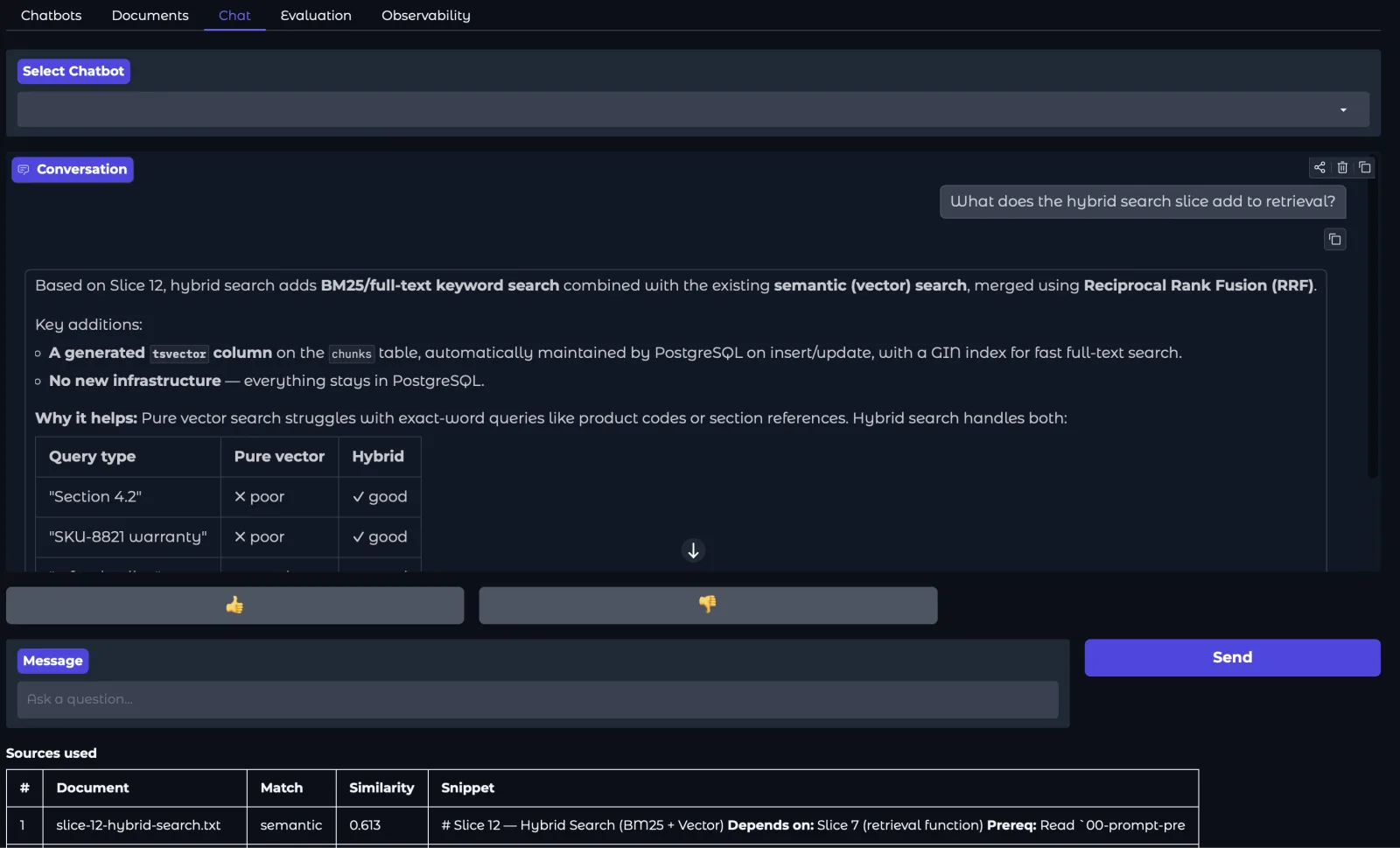
Four formats in
PDF, DOCX, HTML and TXT — parsed, chunked and embedded by a background worker.
Answers with receipts
Every response shows the chunks behind it, and how well each one matched.
Follow-ups that hold
Each question is rewritten into a standalone query before retrieval runs.
One dependency
Docker. Database, queue, object storage and UI all come up together.
How to use it
Four tabs, in the order you need them
From a PDF you have not read to a number telling you whether the answers are any good, the whole loop takes about five minutes.
-
Create a chatbot
The Chatbots tab. Give it a name; it appears in the list. One chatbot per document set — they do not share an index.
-
Upload documents
The Documents tab takes PDF, DOCX, HTML and TXT. Each lands as pending while a background worker parses it, splits it into chunks and embeds each one — five to thirty seconds, depending on size — then flips to ready.
-
Ask it something
The Chat tab streams the answer token by token. Underneath it, a Sources table lists the chunks that were retrieved and how well each matched, so a bad answer is traceable to bad retrieval rather than left as a mystery. Follow-ups are rewritten into standalone questions first; you see the original, not the rewrite.
-
Find out whether it worked
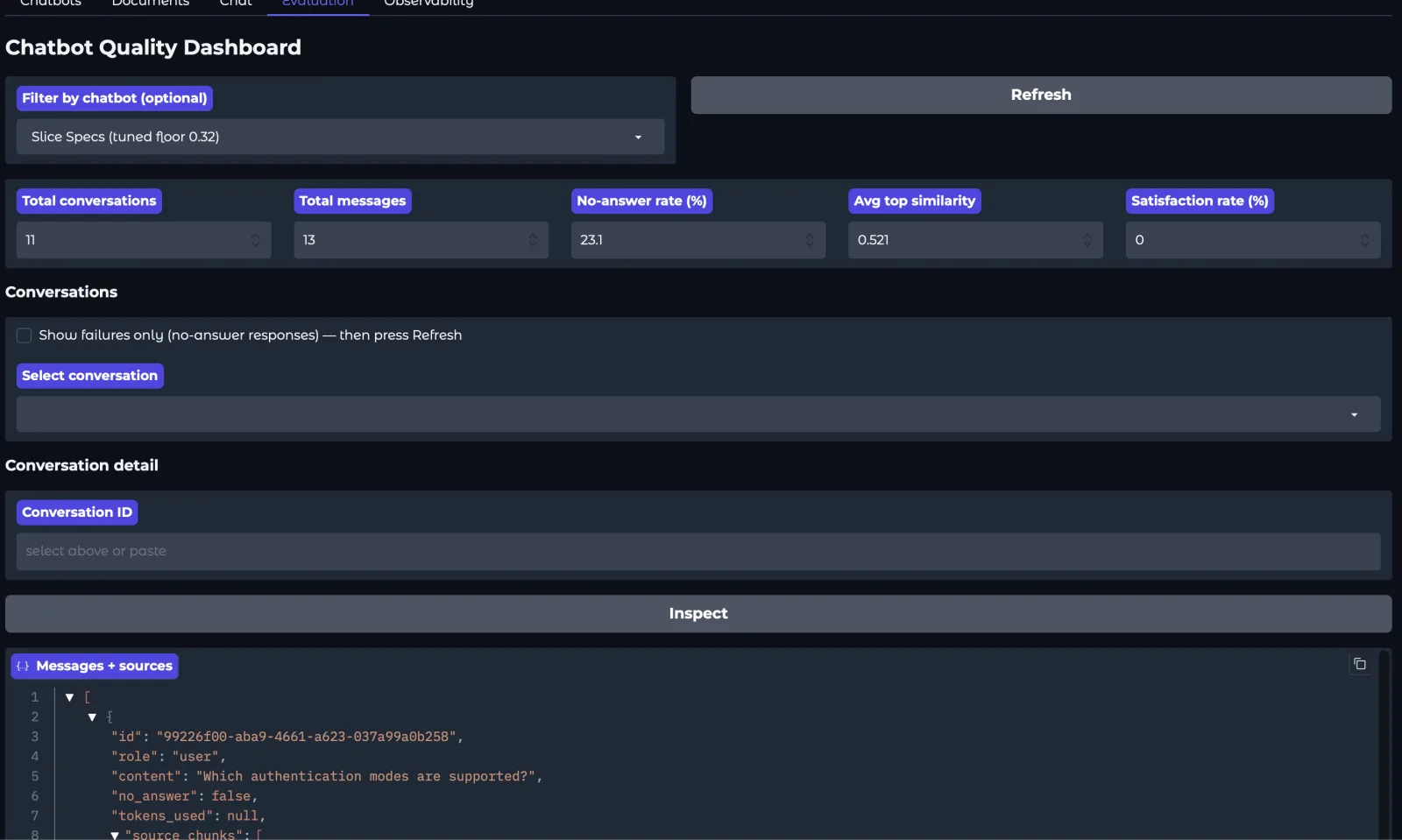
The Evaluation tab, which is the part worth your attention. No-answer rate, mean retrieval similarity, satisfaction from thumbs, and a failures-only filter that takes you straight to the conversations where retrieval found nothing.
| Aspect | The usual approach | KB Chatbot |
|---|---|---|
| Retrieval | Vector similarity alone | Hybrid — vector plus keyword |
| Follow-up questions | Sent to retrieval as typed | Rewritten into a self-contained query first |
| Showing its work | The answer only | Every retrieved chunk, with its similarity score |
| Knowing if it works | Read a few answers and judge | A dashboard over every conversation |
Not a benchmark. Nothing here was measured against another system — comparing retrieval quality honestly means the same corpus, the same questions and the same judge, and I have not done that.
Check it yourself
The dashboard is the point
Reading a dozen answers tells you how the bot performs on a dozen questions you thought to ask. It tells you nothing about the long tail, which is where the failures live. Every claim below is something the running app will show you in under a minute — and the section after it is what happened when I did exactly that.
| Claim | What verifies it | Where |
|---|---|---|
| Retrieval returns chunks that are actually relevant | Sources table, per-chunk similarity | Chat tab |
| It declines instead of inventing when nothing matches | No-answer rate; failures-only filter | Eval tab |
| Follow-ups are resolved before retrieval, not after | Ask one, then read the Sources table | Chat tab |
| Individual answers can be traced end to end | Inspect a conversation by ID | Eval tab |
| Readers find the answers useful, not just plausible | Satisfaction rate from thumbs up/down | Eval tab |
| It comes up clean on a machine that is not mine | docker compose up -d; curl :8000/health | Shell |
What it found
The dashboard earned its keep in an hour
I pointed it at seventeen of my own design documents — 157 chunks, sixteen seconds cold — and asked twelve questions: nine answerable from the corpus, three deliberately not. It found two bugs before I had finished reading the answers.
The first was mine and it was embarrassing: a chunker that looped forever on any sentence it could not fit, which is every Markdown code fence in the corpus. Fifteen of the seventeen files hung the worker at 100% CPU with no error and no output. My earlier test files were small and plain, so it had never fired.
The second was more interesting, because nothing was broken. Asked “which authentication modes are supported?”, retrieval returned the right document ranked first, second, third, fifth, seventh and ninth — and then threw all of it away. The top chunk scored 0.343 against a similarity floor of 0.40. The floor was a constant I had picked by feel, and it sat inside the range of correct answers rather than below it.
Moving the floor into the gap, and making it configurable rather than hard-coded, changed the run:
| Measure | Floor 0.40 | Floor 0.32 |
|---|---|---|
| Answerable questions answered | 7 of 9 | 9 of 9 |
| Unanswerable correctly declined | 3 of 3 | 3 of 3 |
| No-answer rate | 41.7% | 25.0% |
| Mean top-1 similarity | 0.549 | 0.511 |
Seventeen documents, one embedding model, and a fixed set of twelve questions — nine answerable from the corpus, three not. Every row is that set, before and after. Enough to fix my own constant; not enough to recommend 0.32 to anyone else, which is why it is now a setting rather than a better hard-coded number.
Two things in that table are worth more than the headline. The no-answer rate did not just improve — it changed meaning. At 41.7% it was mixing two opposite events: three correct refusals on questions with no answer in the corpus, and two documents it simply failed to find. At 25.0% it is exactly the three unanswerable questions and nothing else.
Which should have been the end of it. Instead I opened the dashboard, read “25% no-answer rate”, and thought for a moment that something was still wrong. Nothing was. Nine of nine answerable questions were answered and three of three unanswerable ones were declined; 25% is the target, not a shortfall. A zero there would mean the bot had confidently invented a parental leave policy. I wrote the question set, built the dashboard and named the metric, and the label still caught me out, because no-answer rate reads like a failure rate no matter who is looking at it. It caught me a second time an hour later, when the figure had drifted to 23.1% and I went looking for the regression: I had simply asked it one more question. A live dashboard is an operations tool, not a benchmark, and reading it as one is a mistake it invites you to make.
That is a flaw in the instrument, not in the reader, and renaming it would not fix it: messages.no_answer records what the bot did, never whether it was right to do it. One column is carrying two opposite events. Splitting them needs a question set that knows which questions ought to have been answerable in the first place — the labelled set and the judge I keep describing as the next thing worth building. I now know precisely what they are for.
And mean similarity fell, from 0.549 to 0.511, while the system got strictly better. Results that had been discarded for scoring low are now included, which drags the average down. A dashboard metric moving in the wrong direction as quality improves is worth knowing about before you put it on a chart and watch it.
Run it yourself
Everything runs in Docker; the only host dependency is Docker itself. Two API keys and five minutes, and it is answering questions about your own documents — or reproducing the run above against mine.
Needs Docker with Compose v2, an OpenAI key for embeddings and an Anthropic key for answers. Demo auth mode accepts any bearer token — do not expose it as-is.
# clone, configure, start
git clone https://github.com/avestea/kb-chatbot
cd kb-chatbot
cp .env.example .env          # add OPENAI_API_KEY and ANTHROPIC_API_KEY
docker compose up -d
docker compose exec api alembic upgrade head

# confirm, then open the UI
curl localhost:8000/health    # → {"status":"ok","db":"connected","redis":"connected"}
open http://localhost:7860
What it is built on
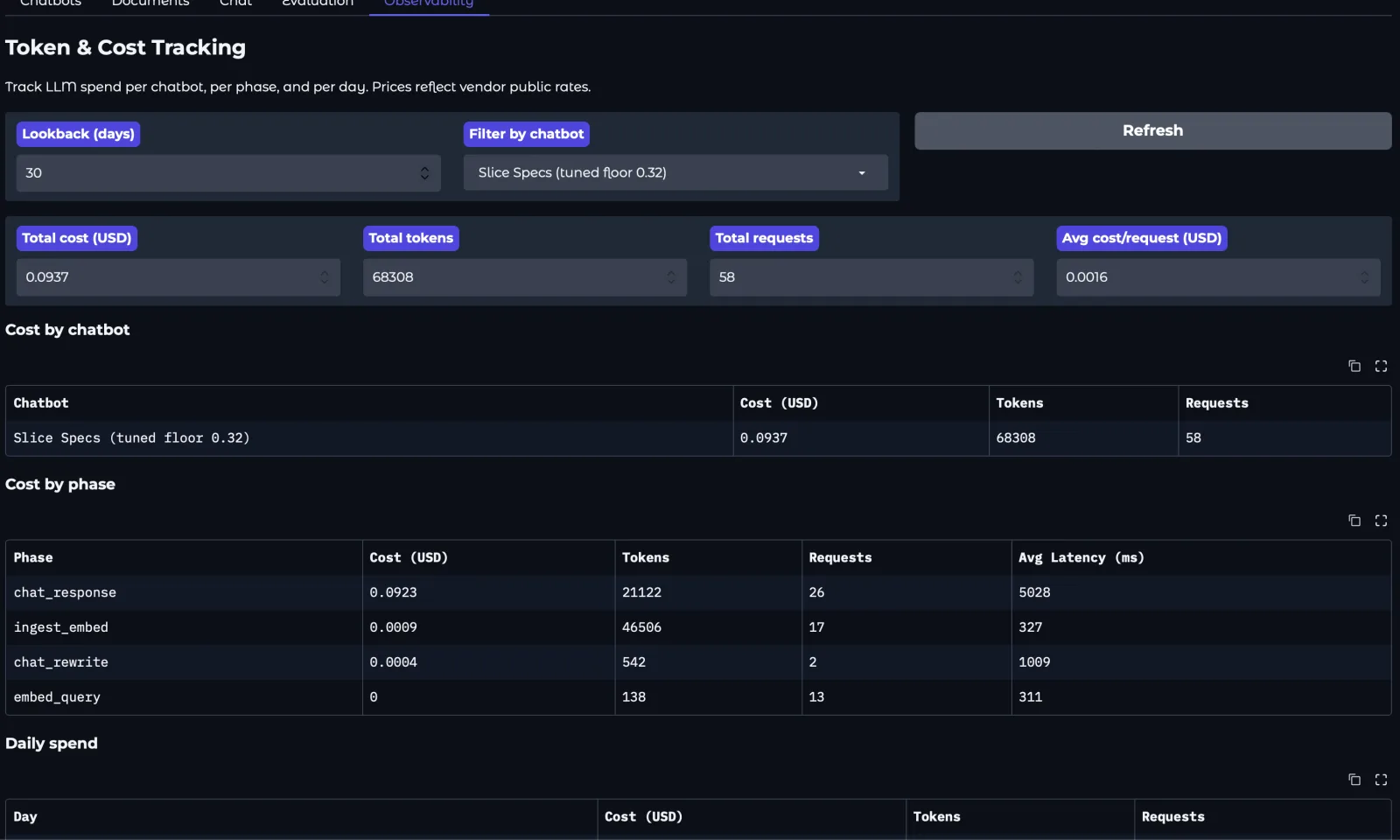
Postgres holds the documents, chunks and embeddings; Redis is the worker queue; MinIO stands in for S3 so uploads behave identically on a laptop and in a deployment. Gradio is the entire frontend, which is the piece I would replace first for anything real — it bought me a working UI in a day and charges for it in flexibility. The dependency worth abstracting first, though, is the embedding provider: it is one call behind an interface, and it is also the thing that decides how good retrieval is. Per question you pay one embedding call and one completion, plus a small rewrite on follow-ups — Haiku for the rewrite, Sonnet for the answer. That is where nearly all the money goes: ingestion is paid once per document and came to about one percent of the run.
The Evaluation tab counts conversations and messages, the no-answer rate, mean retrieval similarity, and satisfaction from thumbs. What it cannot see is the question nobody asked because the previous answer was bad — and it cannot tell a confidently wrong answer that earned a thumbs up from a right one. Both need a person reading transcripts, which is what the inspector is for.
What I would do differently
The ordering was wrong. I built retrieval, then the chat UI, then hybrid search, then query rewriting — and only then, at slices fourteen and fifteen, the feedback buttons and the dashboard. Which means every improvement before that point was justified by intuition rather than by a number. Building the measurement first would have told me which of those changes actually mattered. When I finally did measure, it caught a constant I had chosen by feel and never checked — and then caught me misreading my own dashboard about it.
The other surprise: query rewriting was the change I expected least from and noticed most. Follow-ups are where a naive pipeline quietly falls apart, because “what about the second one?” retrieves nothing at all — and without the Sources table you would never see why.
One caveat worth more than anything above it. If your corpus fits inside a modern model’s context window, retrieval may be pure overhead: paste the documents in, skip the pipeline, get better answers with less machinery. RAG starts earning its complexity when the corpus is too large to fit, changes too often to re-paste, or has to be attributed chunk by chunk. And if you want a knowledge base chatbot rather than an education in building one, buy a hosted product — the distance between a weekend build and a maintained service is not features, it is a year of operational detail that never reaches anyone’s README.